


Pokémon Go Cooldown Chart: Complete Guide to Avoid Soft Ban

Edited by Caroline Ryan | Jul 16, 2026 | Virtual Location
Have you learned Pokémon Go cooldown time? Pokémon Go has implemented many anti-cheating measures to prevent players from cheating, and cooldown time is a common one and vital in players’ battles. Then, if you want to improve your performance in Pokémon GO PvP, understanding cooldown mechanics is essential. While many players focus only on Pokémon stats or type advantages, experienced trainers know that cooldown timing can make the difference between winning and losing. Therefore, let’s learn the full Pokémon Go Cooldown Chart in this article and get a reliable location spoofer with a more intuitive cooldown reminder.
Contents:
Part 1. What is Cooldown in Pokémon Go?
Cooldown in Pokémon Go is basically an inbuilt feature that acts as a safeguard from any form of cheating in the game. To begin with, cooldown simply means the amount of time that needs to elapse between an activity carried out in the game until the next interaction in a new geographical location in the game.
This means the game checks the distance from where the player last performed the action to his current position. If it seems impossible for the player to travel such a distance within the required period (for instance, via teleportation), a cooldown period begins. The duration will automatically trigger failed actions like catching Pokémon and spinning PokéStops, which is known as a soft ban.
Part 2. Pokémon Go Cooldown Chart Overview in 2026
In order not to activate the anti-cheating algorithm of the game, it is necessary to consult the standard cooling chart for the game. The time that will be required for this cooling process completely depends on the distance covered before the next move was made. It should be noted that the maximum cooling period allowed is 2 hours (120 minutes).
Here is a quick overview of the standard distance-to-time ratios:
| Distance Traveled | Required Cooldown Time |
| > 1 km | 1 Minute |
| 5 km | 2 Minutes |
| 10 km | 7 Minutes |
| 25 km | 11 Minutes |
| 50 km | 20 Minutes |
| 100 km | 35 Minutes |
| 250 km | 45 Minutes |
| 500 km | 60 Minutes (1 Hour) |
| 1000+ km | 120 Minutes (2 Hours) |
Tip: If you travel a massive distance, such as flying from New York to Tokyo, you only need to wait a maximum of 2 hours from your last in-game interaction before it is safe to play again.
Part 3. Actions That Trigger Cooldown in Pokémon Go
However, not all movements and taps result in a cooldown process. The cooldown process begins when you make actions that communicate with the server and send your coordinates.
Actions That Trigger Cooldown:
- • Catching wild Pokémon: Successfully catching a Pokémon or even accidentally dropping a Poké Ball on the catch screen.
- • Spinning PokéStops or Gyms: Spinning the photo disc to collect items even if you do not have any space in the bag.
- • Gym Battles & Raids: Feeding a berry to a gym defender locally, placing a Pokémon in a gym, or starting a battle during raids.
- • Fleeing Pokémon: If a Pokémon breaks out and runs away, it still logs your location.
Actions That Do NOT Trigger Cooldown:
- • Moving to a new place without taking any action.
- • Hatching eggs or evolving Pokémon.
- • Completing research tasks or weekly rewards.
- • Trading Pokémon or sending gifts to friends.
Being aware of such actions allows you to follow the cooldown table without any problems.
Part 4. Bonus: A Great POGO Spoofer with Cooldown Time Notes
Although the POGO’s cooldown time mechanism is strict, we can still take good use of a reliable location switcher to fake locations and routes without getting banned. We recommend AnyCoord, which includes a cooldown-time countdown to help you know the left time precisely and clearly. With no need to jailbreak your iOS device, it allows you to quickly and safely modify your GPS location and create the routes you want in Pokémon without physically moving. What’s more, AnyCoord has been upgraded to support Bluetooth connectivity and has fixed Error 12 in POGO.
100% Secure & Clean
100% Secure & Clean
- • Set up a virtual location on the device.
- • Simulate walking movements in the style of AR-based games.
- • Create virtual routes as you need, and support joystick control.
- • Fake displayed location on social media and dating applications.
- • Safely hides your location data.
How to Use AnyCoord
Step 1. Download and install the AnyCoord tool on your Windows or Mac computer. Then, connect your mobile device to your computer via a cable or wireless and open the software.
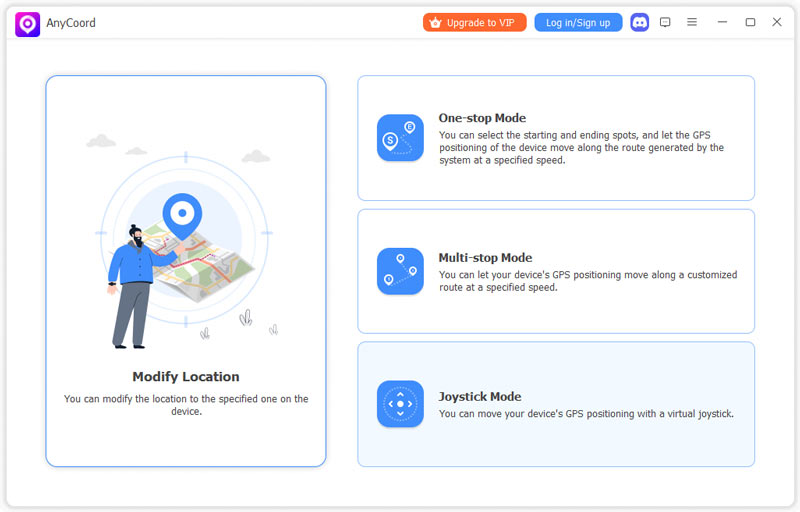
Step 2. Now, you can see its main interface. You can select from the Modify Location, One-stop Mode, Multi-stop Mode, and Joystick Mode options to proceed.
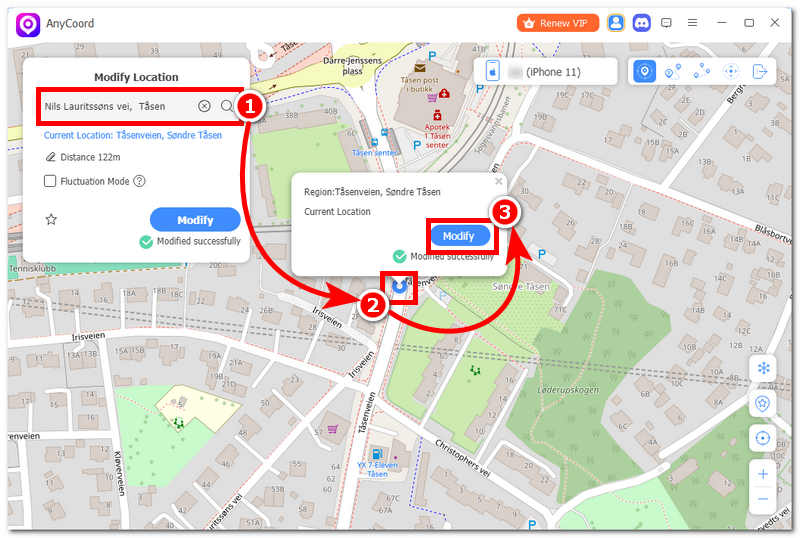
Step 3. Then, you will enter a map page. Input locations you want your mobile device to use temporarily. Once you have your area set up, click on the Modify button to finally start the spoofing process. After that, you can check your mobile device's location and confirm that it has been successfully set as your virtual location.
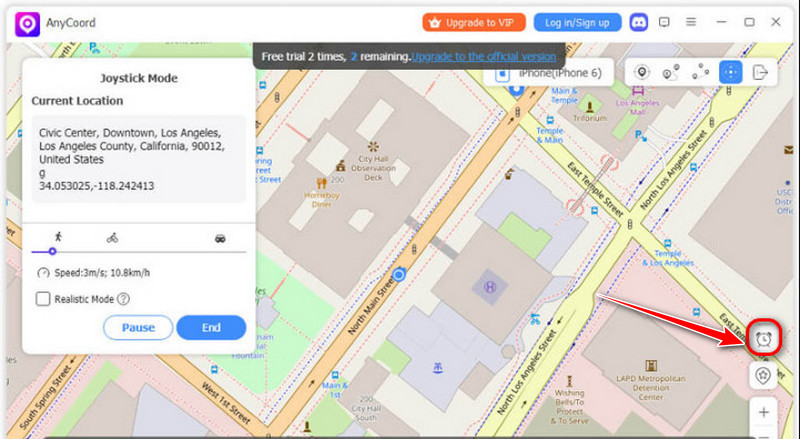
You can see the cooldown time countdown in the lower-right corner.
Part 5. FAQs About Pokémon Go Cooldown Time
What would happen if I forcefully capture Pokémon during the cooldown period?
If you try to interact before the cooling time, your game will recognize you as in violation mode. In such a case, the wild Pokémon will surely escape once it eats a Poké Ball, and upon rotation of the supply station, it will show Please try again later and not drop anything. This process is known as Soft Ban.
Will playing games on a high-speed train or plane trigger a cooldown time?
Yes, it will. If you frequently open the game and try to catch Pokémon or spin wheels on a high-speed moving vehicle, the game server will detect that your movement speed far exceeds the normal walking or cycling speed (usually exceeding 40-50 kilometers per hour) and automatically trigger the cooling lock. However, it is okay if you only keep the game on during long-distance fast movements, without capturing or battles.
Accidentally tapping into the capture interface of the wild Pokémon, but not throwing the ball, will it trigger a cooldown?
It won't. As long as you haven't fed any fruits or thrown any Poké Balls, you won't send location interaction requests to the server. In this case, you can directly exit the interface and move freely to other places.
How to ensure the safest way to avoid violating cooling rules?
The simplest and safest golden rule is to strictly obey the 2-hour rule. No matter how far you switch on the map, as long as you sit still or wait for a full 120 minutes after the last recorded operation, you can safely play the game in any new location in the world. Or more easily, use AnyCoord, which can remind you of the specific cooldown time according to the distance.
Conclusion
In conclusion, knowledge of the Pokémon Go cooldown system is very important for all trainers to secure their accounts and have a great experience playing the game. The cooldown period for the game totally depends on how far you travel, and the maximum global limit is 2 hours. In daily games, as long as you distinguish which behaviors will trigger coordinate locking and which behaviors are safe, and strictly follow the correspondence between distance and time, you can perfectly avoid the punishment from Pokémon. If you need a reliable and easy Pokémon Spoofer, you can try AnyCoord to play POGO from home.

AnyCoord is the best tool to change, hide, or spoof your location in games, social media apps, and other apps on iPhone or Android devices.
100% Secure & Clean
100% Secure & Clean