


GPS Location Not Found 11 Pokémon GO Spoofing: Causes & Fixes (2026 Guide)

Edited by Caroline Ryan | Jul 16, 2026 | Virtual Location
Have you encountered the "GPS location not found (11)" message when you play in Pokémon GO? If the answer is yes, don’t panic, you are not alone. This troublesome error is rather popular among Pokémon players. It will stop Pokémon GO from detecting your location, and prevent you from catching Pokémon, spinning PokéStops, and attending events. Therefore, in this article, we will reveal the essence of the GPS location not found (11) error and solutions to deal with it.
Contents:
Part 1. What Does “GPS Location Not Found 11” Mean in Pokémon GO?
This error occurs when Pokémon GO is unable to locate or confirm your current GPS location. Since this is an integral aspect of the game, the error almost prevents you from playing the game. For example, you cannot catch Pokémon, spin PokéStops, or attend events.
Causes of the GPS Location Not Found 11
1. Poor or Restricted GPS Signal
Being inside, underground, or among tall buildings will prevent your device from receiving a sufficient GPS signal.
2. Disabling or Incorrect Configuration of Location Services
Your location being either indoors, below ground level, or surrounded by tall buildings would mean that you cannot get a good GPS signal.
3. Network and System Problems
The game needs an exact location to play, but when your location services are either disabled or set to use low accuracy, the game won’t know this information.
4. Problems with Spoofing Tools
Spoofing tools may interfere with the GPS signal received by your device, causing Error 11.
Part 2. How to Fix GPS Location Not Found 11 in Pokémon GO
Way 1. Restart Device/App: This way involves restarting your device or app in order to restore GPS modules and resolve any glitches.
Way 2. Enable High-Accuracy Location Setting: Make sure that you enable the high-accuracy location setting (GPS, Wi-Fi/Mobile Network).
Way 3. Switch to Airplane Mode: Turn on Airplane Mode for a few seconds, then turn it off to refresh network connections.
Way 4. Reset Network Settings: This could be useful for solving any problems related to GPS and the network.
Way 5. Go Outdoors: You need to go to open areas for receiving more stable GPS signals.
Way 6. Disable Mock Location Settings: Some devices require disabling mock locations to prevent conflicts with spoofing tools.
Way 7. Avoid Using VPN with GPS Spoofing: Using a VPN alongside spoofing may create inconsistencies between IP and GPS location.
Way 8. Update Pokémon GO and Device System: Outdated software can cause compatibility issues and trigger errors.
Part 3. Best Solution – Fix GPS Error 11 While Spoofing (Recommended)
Simple solutions might be enough for ordinary users, but spoofers frequently experience various problems because their cause is different. What happens is that there is a contradiction between actual GPS coordinates and fake location information. Here is where the professional service AnyCoord can help.
AnyCoord is a lightweight software-based tool with user-friendly interface. It supports not only fake locations on the map or dating apps for your privacy, but also location or route spoofing in AR-based games like POGO. More importantly, it has solved the GPS Error 11 and Error 12. With it, your location in the virtual network world is customizable.
100% Secure & Clean
100% Secure & Clean
- • Change GPS location instantly without jailbreaking
- • Be compatible with both iOS and Android devices
- • Simulate real movement with adjustable speed
- • Fix common errors like GPS Error 11 and Error 12
- • Stable Bluetooth connection to avoid bans
How to use AnyCoord without Error 11
Step 1. Download, install, and run AnyCoord on your device. Connect your device to the computer via a USB cable.
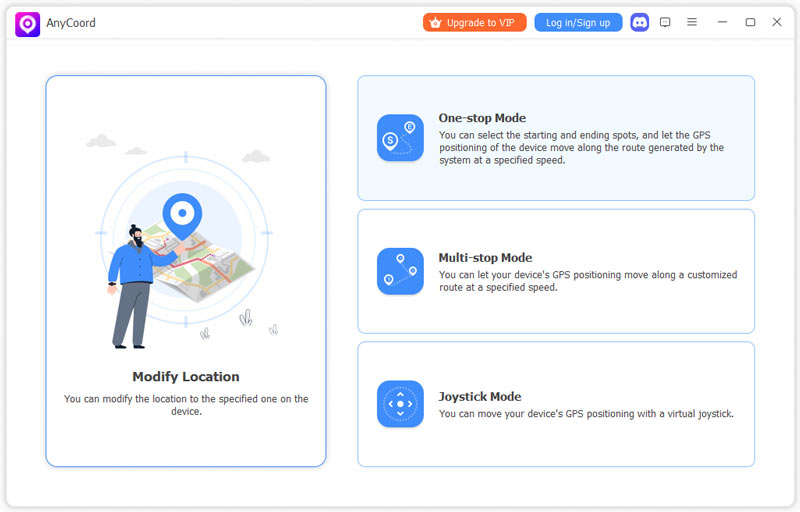
Step 2. First, click the One-stop or Multi-stop Mode button on the Pokémon GO location changer's main interface.
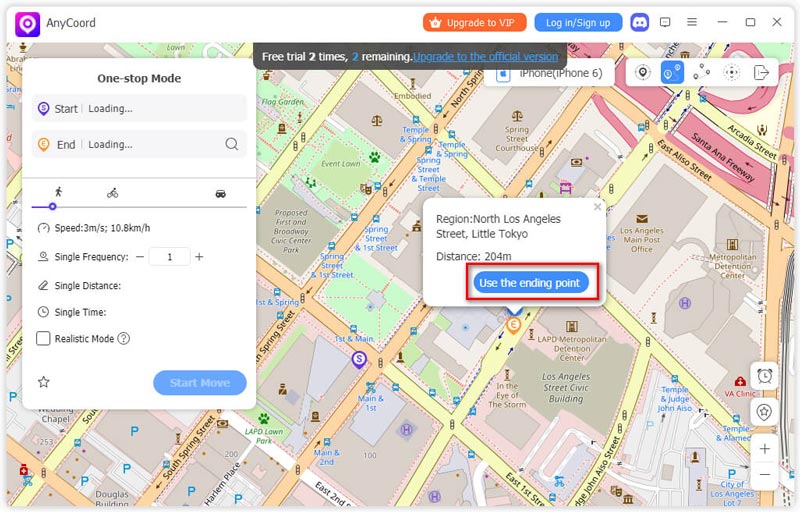
Step 3. Then, you will enter a map. Directly input the names of your route's starting and ending points into the box in the upper-left-hand corner of the map.
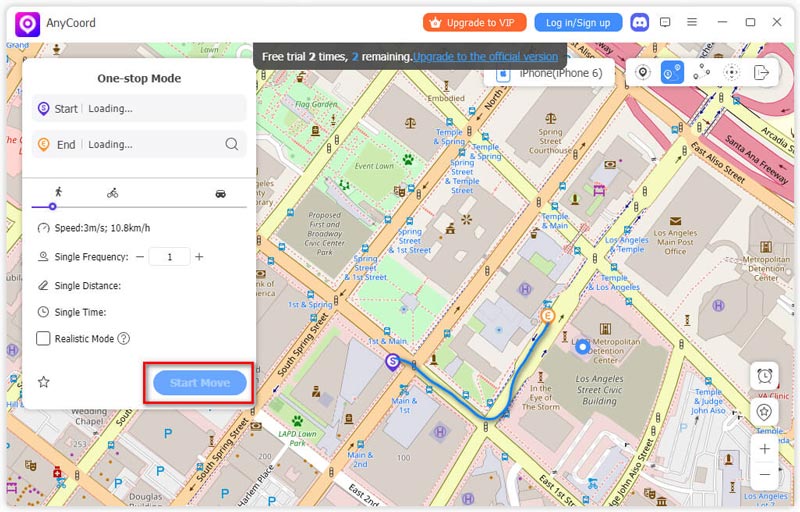
Step 4. After setting the route, click the Start Move button to let your Phone move along the route.
Tips: For a better game experience, you can choose Pro Game Mode, which uses Bluetooth connectivity to avoid bans. When you first use this mode, you need to pair your mobile device and your computer. Here is a detailed guide to establishing a Bluetooth Connection in Game Mode.
If you’re tired of constant GPS errors while spoofing, AnyCoord offers a stable and safe way to play Pokémon GO from anywhere. Try it to eliminate Error 11 and enjoy uninterrupted gameplay.
100% Secure & Clean
100% Secure & Clean
Part 4. Pro Tips to Avoid GPS Location Not Found 11
- • Always Use a Stable Internet Connection: This guarantees the precision of GPS data transmission.
- • Do Not Teleport Instantly Between Distant Locations: Doing so will alert the game, resulting in an error.
- • Location Services Must Always Be Enabled: Keep GPS and permissions for Pokémon GO active at all times.
- • Only Use Reputable Spoofing Software: Poor or outdated software tends to result in GPS errors.
Part 5. FAQs About Pokémon GO GPS Error 11
Can I play Pokémon GO without using GPS?
No, you cannot. Pokémon GO is an AR-based game, which requires a lot of location services through GPS. If Pokémon Go system cannot detect your current GPS, it will prevent you from playing.
Why does GPS error occur after spoofing?
This is caused by some form of spoofing that causes your GPS data on your phone to differ from your virtual location. So you need to choose a reliable location spoofer that can help you evade the detection from official, like AnyCoord, iMyFone AnyTo, iAnyGo, etc.
Is Error 11 permanently linked to GPS?
Not necessarily. This error can be fixed through some modifications of settings or even by the use of a suitable spoofing program, like AnyCoord.
Conclusion
Error 11 (GPS location not found) in Pokémon GO is one of the issues that arise quite often and that can be fixed easily. Whereas basic troubleshooting will work fine for regular users, it is a different story when talking about spoofers. When one knows what the problem is and how to deal with it using the right software such as AnyCoord - no more problems with GPS location.


AnyCoord is the best tool to change, hide, or spoof your location in games, social media apps, and other apps on iPhone or Android devices.
100% Secure & Clean
100% Secure & Clean