


[Explained] What is Snap Map: A Comprehensive Introduction for Everyone

Edited by Caroline Ryan | Sep 11, 2026 | Virtual Location
Snap Map is a feature in the Snapchat app. It allows users to view and share their geographic location. With Snap Map, you can view the locations of your Snapchat friends, share your area, and explore Snaps from nearby users or those attending a specific event or place. What’s more, this location-sharing feature is accessible to users globally. This article will brief introduce it, including What is Snap Map, how Snap Map works, and how to use it step by step. Keep reading for this helpful function.

Contents:
Part 1. What is Snap Map and How Do Snap Map Work
What is Snap Map?
Snap Map is a feature within Snapchat that allows users to explore places, locate their friends when location services are turned on, and find Snaps posted by the Snapchat community. Your location on the map updates as you use Snapchat, depending on the location settings.
The Explore Layer feature of the Snap Map can help users to explore public Snaps. These Snaps capture different locations, places, and events from varied angles. The content may be organized into City Stories, Place Stories, and other map collections by Snapchat, thereby allowing users to view public content in relation to locations.
How do Snap Map Work
It uses a device's GPS to position users on a virtual map, which SnapChat users can see. It can determine a user's location and display it on a map in real time.
Snapchat Map Function
1. Check your friend's location. If you have access to your friends' locations, you can see their locations directly on the Snap map. If you want to chat, you can click on their avatar.
2. Want to know where a particular friend is? You can enter a friend's name directly into the search bar to find a specific friend.
3. Find out about public Snaps and Hot Spots. With Snap Map, you will be able to browse Snaps that have been added by Snapchatters from all over the world. By using the Explore Layer feature, you can find out about public Snaps from different locations or events. There is also a Hot Spots layer, which helps you locate popular areas using the heat map option.
4. Learn about the Stories related to places and events. Instead of calling this feature our Stories, Snapchat now categorizes its public content under various categories, including City Stories, Place Stories, and Event Stories. Based on the location you are in, you will be able to view the stories and public Snaps that pertain to the location or event.
5. Share your location in real-time with friends and family. On Snapchat, you can choose to share your location with your friends or family members. If you have Always/background location turned on, the selected people will still be able to see your location in real time even if Snapchat is not open. Location sharing is disabled by default.
Part 2. How to Use Snapchat Map
Snap Map can display snapshots from friends and public snapshots from around the globe to form an interactive social map. Since Snap Map is such an exciting feature, let's discuss how to use it in this section.
Note: Friend locations are only visible when the other party has shared their position; they do not appear for users in Ghost Mode.
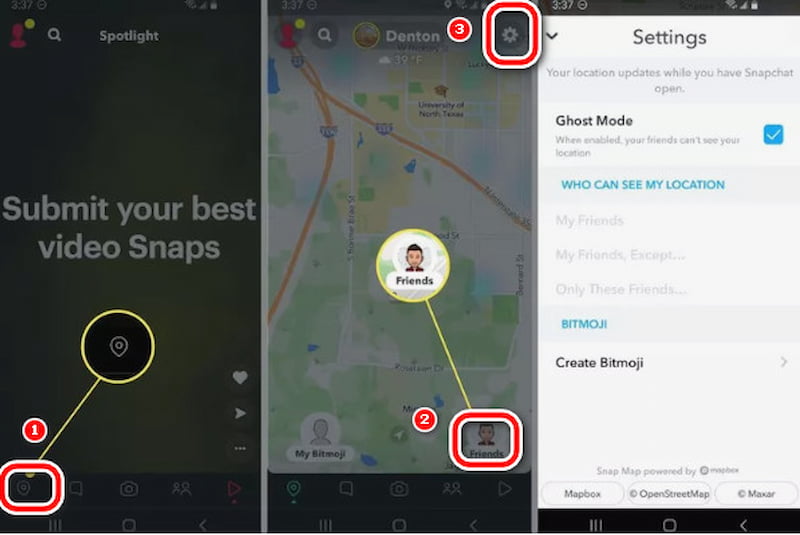
Step 1. We should know how to locate Snap Map on Snap Chat. Just launch Snapchat and tap the map icon at the bottom of the screen. Your Snap Map will appear instantly.
Step 2. You can also select Friends to view the locations shared by your friends. To adjust your Snap Map settings, click the Settings button, a gear icon.
Step 3. Select a friend's picture in the Friends tab. If they have shared their location, a preview image will be displayed beneath their name on their profile. Tap on it to access the Snap Map.
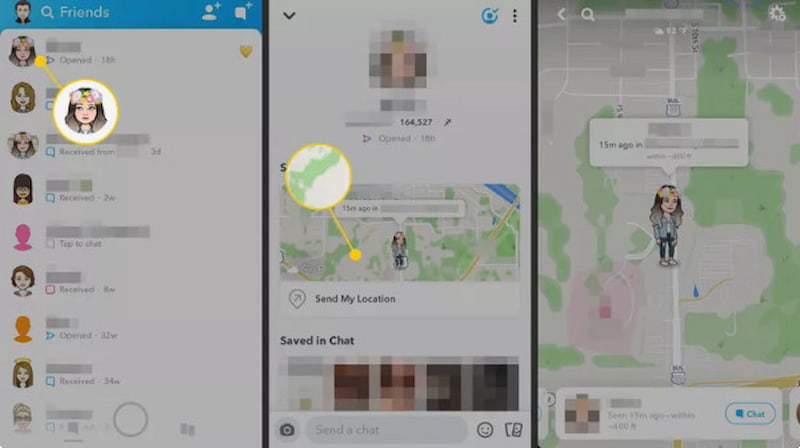
Attention: If you open the Snap Map for the first time, you might need to set up your Snap Map preferences. You can decide if you want your location to be visible to only yourself, your friends, or selected friends.
Part 3. Is Snap Map Safe? Privacy Risks Explained
Snap Map is usually safe. However, sharing your location might lead to privacy problems. Make use of Ghost Mode, share your location only with friends you trust, and do not post Snaps showing your exact location.
But Ghost Mode only hides your location from other users. Snapchat can still get your real location. If you want to completely spoof location to your apps and phone, you can try AnyCoord.
Part 4. Use AnyCoord to Keep Your Privacy Safe
Since Snap Map can be precise and effective in helping you locate your friends' locations, you can interact better. At the same time, many parents are worried about leaking their children's safety information, leading to being followed by strangers, etc. What can be done to make it look like your location is displayed on the map without revealing your accurate information? AnyCoord can help you with this.
100% Secure & Clean
100% Secure & Clean
Features:
• It can alter your GPS location on iPhone or Android devices.
• It can change your location on social media and location-based games, hide your location on your iPhone or Android device, and adjust your location on dating apps.
• Fully secure and crafted to safeguard your privacy.
• 7-day free trial and 30-day money-back guarantee.
• The annoying Pokemon Go Failed to Detect Location 12 Fixed.
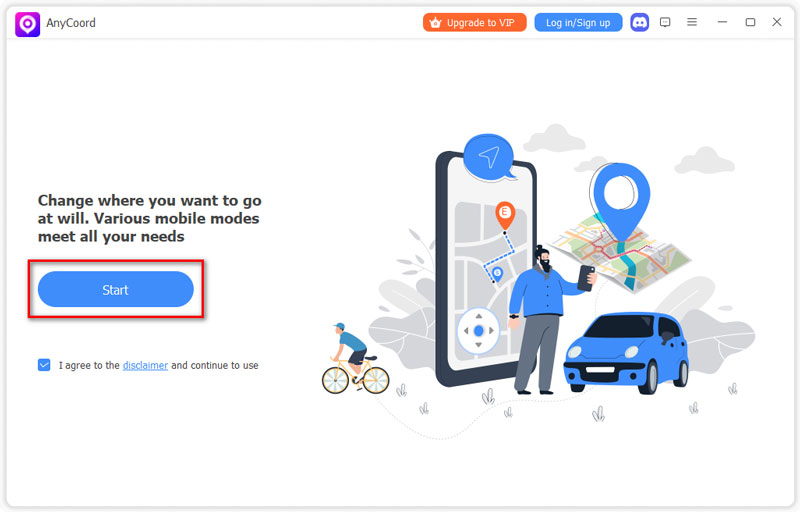
Step 1. Connect your phone to the computer. Open the software to access its intuitive interface, then click on Start.
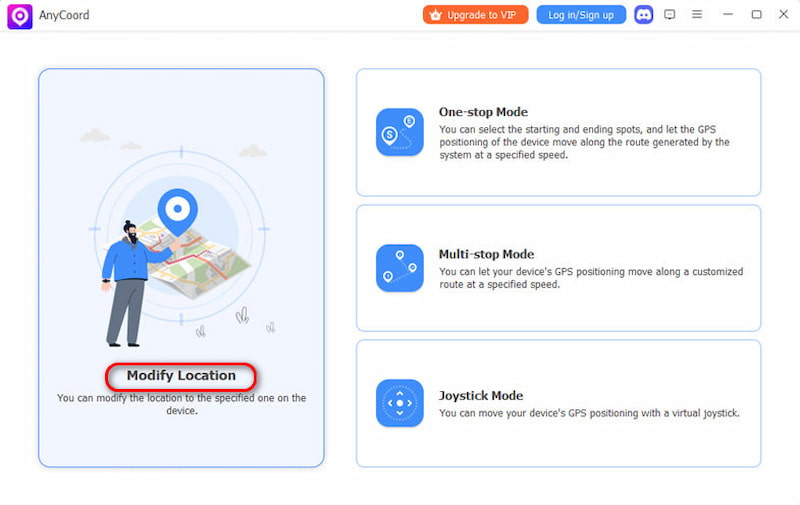
Step 2. AnyCoord offers three unique modes for altering GPS locations on iPhones and other devices: One-stop, Multi-stop, and Joystick. To begin, click the Modify Location button on the options page.
Step 3. A detailed map displaying your iPhone's location will appear. If you have a specific destination, enter it in the search bar. If you’re unsure of the exact location, you can verify it by clicking on the map. Once you’ve found it, click on Confirm Modify. Your phone's GPS location will be updated swiftly and effortlessly.
Part 5. FAQs about Snap Map
-
1Can my Snapchat friends see my location?
Yes, but only if you choose to share it. Snap Map location sharing is off by default. You can choose which friends can see your location, or hide it completely with Ghost Mode.
-
2How to activate Ghost Mode?
Open Snap Map, tap Settings, and turn on Ghost Mode. You can also choose how long you want Ghost Mode to remain active. Once enabled, your location won’t be visible to friends on Snap Map.
-
3Will Snap Map keep updating my location?
Normally, your Snap Map location updates when you open Snapchat. However, Live Location sharing can allow selected friends to see your location continuously for the period you choose.
Conclusion
This article explains in detail what Snap Map is, how it works, and how to use it. This fun and rich map feature brings convenience to users, but it also has some risks. To allow users to enjoy this map feature while protecting privacy, we recommend AnyCoord. It can quickly help you make a virtual location. If you want to protect your privacy and safety, try this tool; it will not disappoint you!



AnyCoord is the best tool to change, hide, or spoof your location in games, social media apps, and other apps on iPhone or Android devices.
100% Secure & Clean
100% Secure & Clean