


A Step-by-step Tutorial to Spoof Location on Android

Edited by Caroline Ryan | Aug 14, 2026 | Virtual Location
Do you wish to be somewhere but aren’t physically present? It might come in handy to change your location on Android for various reasons, from testing GPS-based software to preserving your privacy. In this article, we will introduce a reliable location tool and help you get started with faking your location on Android without root privileges.
Contents:
Part 1. Can You Fake GPS Location?
Yes, it’s entirely possible to fake your GPS location on an Android device, and it’s easier than you might think. Android’s open system offers more flexibility compared to iOS, allowing users to manipulate their location through various methods. By using third-party apps and enabling Developer Options, you can set your phone to show a completely different location than where you actually are.
Once Developer Options are enabled, you can download some location mocking apps from Google, such as AnyCoord, iToolab AnyGo, and so on. After selecting the app as your mock location tool, you can easily input any location in the world. Your device will report that specific location to all apps, including maps, games, and even social media platforms.

However, it’s important to note that while faking your GPS location is possible, it can also carry certain risks. Some apps, particularly location-based games like Pokémon Go, have strict policies against location spoofing and may penalize users for attempting to cheat by faking their GPS. So, while it’s a handy tool, make sure to use it wisely to avoid any potential consequences.
Part 2. How to Fake Your Location on Android (3 Steps)
If you're looking for an easy and reliable way to fake your location on Android, one of the best tools available is AnyCoord. This app allows you to change your GPS location quickly and effectively, tricking your phone into thinking you’re in a completely different place.
One of the key advantages is that AnyCoord has installed an anti-detection mechanism. That makes it a safe and reliable way to spoof your location without risking your device’s security. Unlike some other GPS spoofing apps, AnyCoord inserted a function called "Bionic mechanism". It will stop and change the speed randomly to simulate the most realistic situation, depending on your transportation. Cars, for instance, will stop waiting for traffic lights.
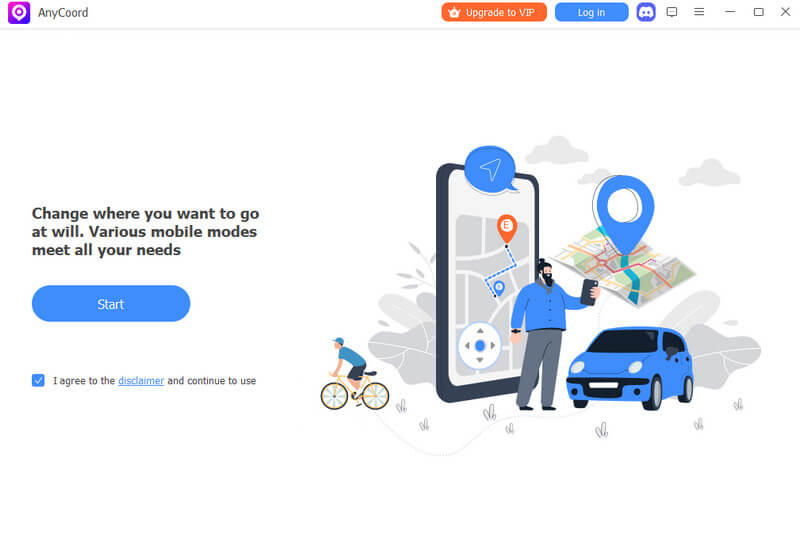
In addition to its safety, AnyCoord stands out for its user-friendly interface. You don’t need to be a tech expert to use it—just a few simple steps will have you teleport your location anywhere in the world. Once installed and set up, AnyCoord allows you to enter a specific area or even simulate movement between multiple locations, which is particularly useful for apps that track your movement, such as Pokémon Go or fitness apps. You can choose any spot on the map, and your Android device will report that location to all apps that rely on GPS data.
Whether you're a developer testing location-based features or simply want to explore new possibilities with your Android device, AnyCoord allows you to spoof iPhone’s location without jailbreak and don’t require any professional knowledge.
100% Secure & Clean
100% Secure & Clean
Features
• Spoof location without jailbreak
• Use advanced anti-detection mode to avoid risks
• Fake GPS in various modes with one/multi-stop and joystick mode
• Save or input GPX files to save your customization
• Strong compatibility with location-based apps and AR games
• Fully support on the latest iOS 26 and Android 16
Detailed Steps
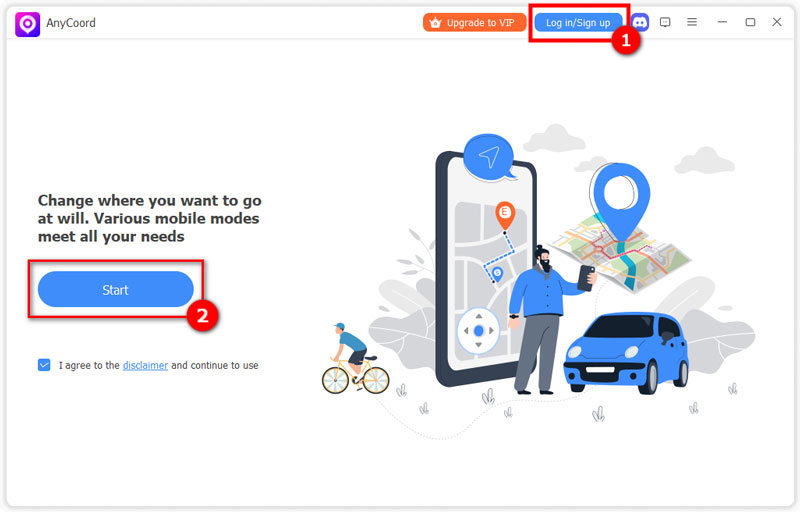
Step 1. Download AnyCoord and open it. Next, click "Log in/Sign up" to log in to your account. If you don’t have one, they will create a new one for you.
Step 2. Then, select "Modify Location".
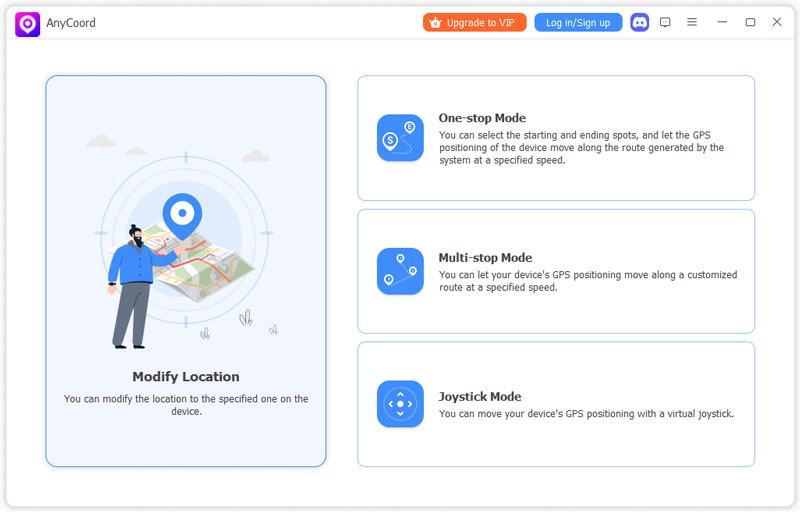
Step 3. At last, enter or click a location on the map. Once it’s done, choose "Confirm Modify".
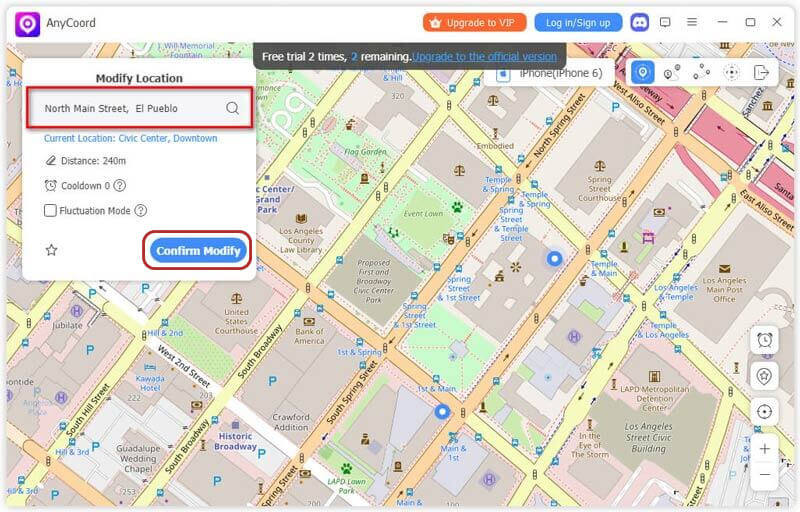
Note: If you want to fake your moving process, you can choose other 3 modes.
Tips: Rooting can also fake location on Android, which provides more control over Android's location system, but the process is more complicated and carries additional risks. At the meanwhile, rooting procedures vary significantly between Android versions and manufacturers. Unlocking the bootloader may also erase your data, and flashing an incorrect image can cause boot problems. Therefore, we don’t recommend trying this way. For most users, the professional AnyCoord without root is much safer and easier.
Part 3. Is There a Risk to Using Location Spoofers?
Normally, yes. Using location spoofers can carry some risks, especially when using less reliable or unauthorized apps. Many location spoofing tools can expose your device to malware, compromise your privacy, or even cause your apps to malfunction. Additionally, certain location-based apps, such as Pokémon Go, have strict policies against GPS manipulation and may ban accounts that engage in spoofing, especially if the spoofing is detected as suspicious.

However, AnyCoord stands out as a safer alternative. It is designed with user privacy in mind, ensuring that your personal data remains secure while using the app. What makes it different from other spoofing tools is that AnyCoord doesn’t compromise device security or violate app permissions. It offers a smooth and reliable experience, minimizing the risk of detection and potential penalties from apps that monitor GPS activity.
While all spoofing carries some level of risk, AnyCoord provides a safer and more controlled environment, making it one of the most trusted options for faking your location with confidence.
Part 4. FAQs on Faking Your Location on Android
-
1Is it safe to spoof my Android location?
Generally, using a reputable mock location app is relatively safe, but some apps may detect or restrict spoofed locations. The recommended AnyCoord is a 100% safe location spoofer.
-
2Do I need to root my phone to fake GPS?
It depends. Most professional location changers don’t require rooting your Android phone, such as AnyCoord. By the way, root access is very complex and is mainly useful for more advanced system-level control. If you intend to spoof location on Android devices, we suggest that you choose the way without root.
-
3Why does my fake location keep jumping back?
Your phone may be detecting mock locations, or Android's GPS and other location services may be overriding the spoofed position.
Conclusion
Faking location on an Android phone without rooting can be easily done. In this guide, we introduce the possibility, operation steps, and risks of spoofing GPS location. If you are searching for a simple way, then try using the recommended virtual location tool – AnyCoord in this blog.



AnyCoord is the best tool to change, hide, or spoof your location in games, social media apps, and other apps on iPhone or Android devices.
100% Secure & Clean
100% Secure & Clean