



Share Location on Instagram Via DMs, Stories, and Bio Trick

Edited by Caroline Ryan | Aug 31, 2026 | Virtual Location
Instagram is a social media platform that lets users share videos and photos through Stories and Reels, offering a dedicated space to showcase their cherished content while staying connected to global trends. As a platform that fosters connection, it has introduced a feature that takes connection among peers, family, or close individuals to a whole new level by allowing them to share their real-life locations. This feature is mainly used to update the user's current whereabouts, send navigation, or support safe monitoring.
As useful as it can be, there are multiple ways to share a live location on Instagram, and this article has listed three methods in a step-by-step process. In addition, as a bonus tip regarding Instagram location, it can also be used against the user to reveal their current location. This article will also teach you how to spoof or fake your Instagram location to avoid sharing your real-time location while using the app.
Contents:
Part 1. Can You Share Live Location on Instagram?
Yes, users can share live Instagram locations in multiple ways. It can be done via a personal direct message and a friend map function. This feature is not only useful but also makes updating your friends on the platform much easier.
In this section, we listed three ways to share your location on Instagram via features within the platform that do not require you to jailbreak your device or use a third-party tool.
Method 1: Share Location via DMs
Sharing of location on Instagram was first introduced via direct messaging. This feature has allowed users to send their real location to the other user and is mainly used for updating and navigation. This feature not only allows users to share their live location only with selected people, but also limits live location sharing to one hour, ensuring that location sharing automatically stops after an hour. This is especially useful when users forget to stop sharing their location manually.
Best for: Sharing your real-time location privately with specific friends or family members through Instagram messages.
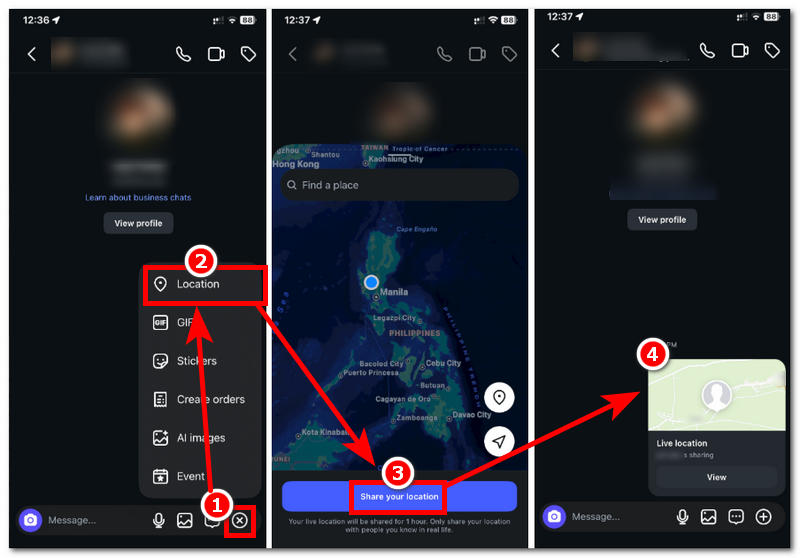
Step 1. Open your Instagram application from your mobile device, and from there head over to your Messaging tab.
Step 2. From your messaging tab, select a user you wish to share your location with and proceed to tap into your conversation.
Step 3. To share your live location, tap on the + button in your messaging field and, from there, tap on Location.
Step 4. Once you tap on Location, you will see your current whereabouts on the Map to confirm your location. Once you are ready to share your location for an hour, tap on Share Your Location to start sharing your live location with the other user.
Method 2: Add A Location Sticker in Stories
Another way to add a location on Instagram is through Stickers in Instagram Stories. At the same time, this does not provide users with real-time location but rather a specific pin location where the media was taken. Thus, other users cannot view your real-time location; they can only see the location where you pin the media. This feature is perfect for updating your location for all your Instagram mutuals without sharing your real-time location.
Best for: Sharing a place, event, or travel location with your Instagram followers without revealing your live location.
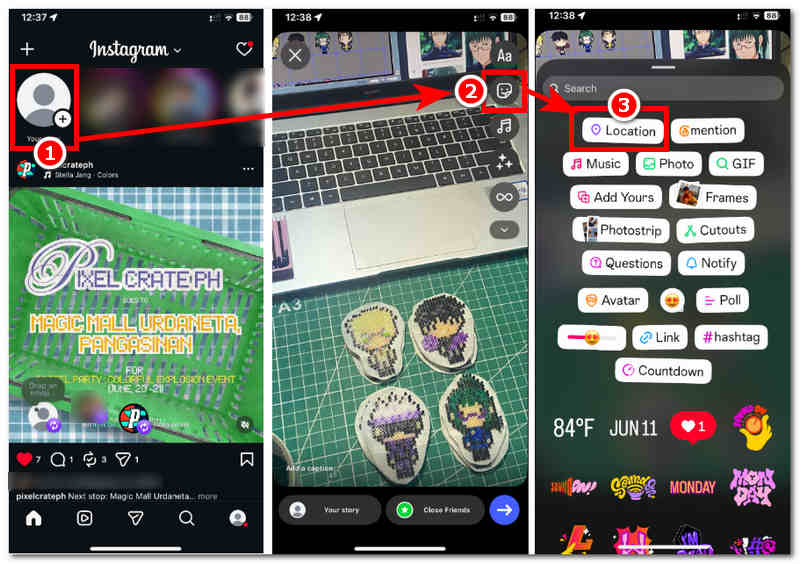
Step 1. To access the Location Sticker, open your Instagram application and, from there, create or post a Story in your account.
Step 2. Once you have your media in the Instagram Story, tap on the Sticker icon from the sidebar of the Instagram Story. From there, tap on the Location sticker.
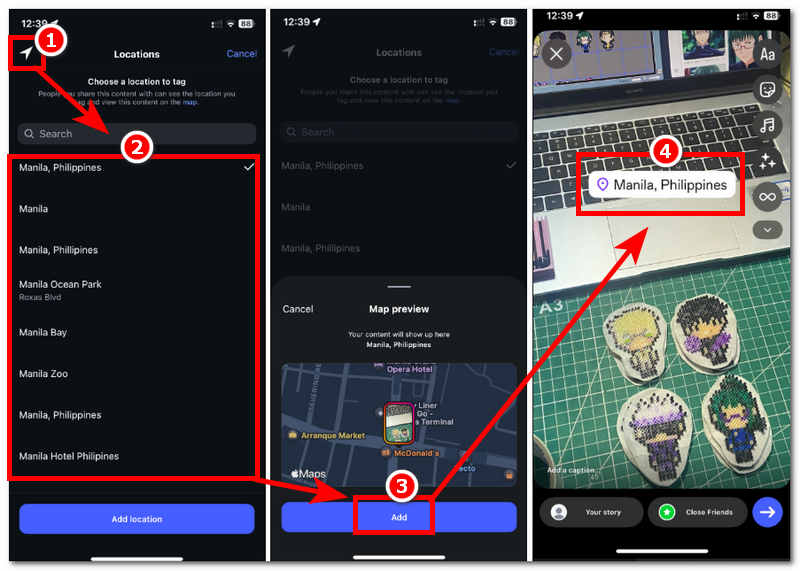
Step 3. When selecting a location, if you want more accurate location details, tap the arrow icon in the upper-left corner of your screen. This will generate all the locations that you may use to tag in your photo based on your current whereabouts.
Step 4. Once you have selected a location to use as your sticker, tap the Add button, and the location sticker will appear in your Instagram Story.
Method 3: Use External Apps
Another method to share your live location is by using an external location-based app (Google Maps). A location-based app like Google Maps has more accurate location-sharing capabilities, so sending this to your close friends will let them know your exact location.
Best for: Sharing more accurate live location updates with friends who need precise navigation or real-time tracking.
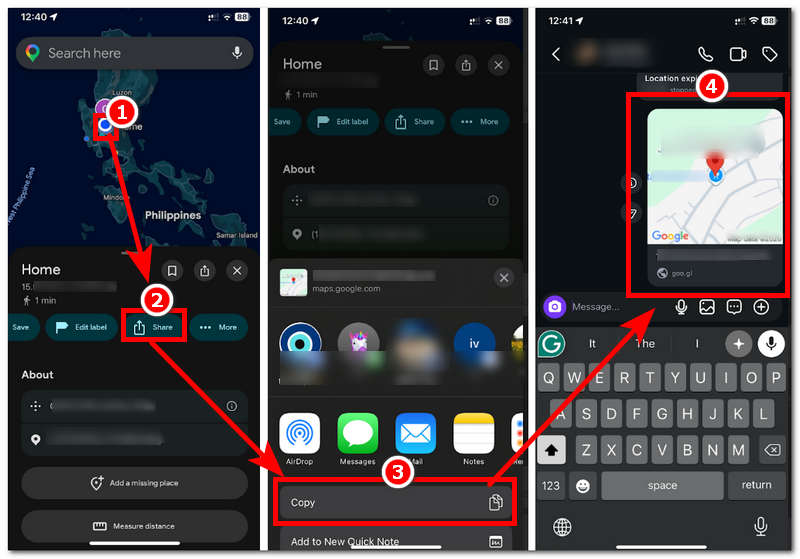
Step 1. Open your Google Maps app from your mobile device. From there, tap on your location (blue dot).
Step 2. After tapping your current location, simply proceed to tap on the Share button and copy the link to your location from it.
Step 3. Once you have managed to copy the link to your location to share it with your mutual friend on Instagram, simply head over to your conversation, paste the link and hit the send button for them to access the link and have a real-time view of your location.
Part 2. Tips: How to Spoof Location on Instagram
Now that you have learned various methods for you to share your Instagram live location with other users on the platform via DMs, Stories, or external apps. Another helpful tip this section will teach you is how to fake or spoof your location in Instagram without the other user knowing.
If you are curious, why resort to this? It’s because there are instances where users can still view your location even if you have disabled sharing it with them. Thus, to ease your mind about your current whereabouts, you can trick others who view your location by using a location spoofing tool like AnyCoord. A location spoofing tool is a third-party tool commonly used for location-based games, but it can also be used to hide your device's location and keep it secure, while you may still use location-based apps and platforms normally.
Key Features:
• It has accurate GPS technology.
• It supports changing the device location to any location anywhere in the world.
• Guaranteed to work and an undetectable location spoofing tool.
• Safe-to-use tool for iOS and Android devices.
• It has a wide range of supported location-based apps, games, and platforms for use.
• It has a very user-friendly interface.
• Fast location-changing tool.
• It can simulate route movements from one point to another.
• The route movement can be customized to provide a more human-like simulation.
How to Use AnyCoord to Spoof Location
Step 1. Download the AnyCoord software tool on your Windows or Mac device. Once done, proceed to install and open the software from your desktop device. After that, connect your mobile device that has your Instagram app to your desktop device via a USB connection to proceed.
100% Secure & Clean
100% Secure & Clean
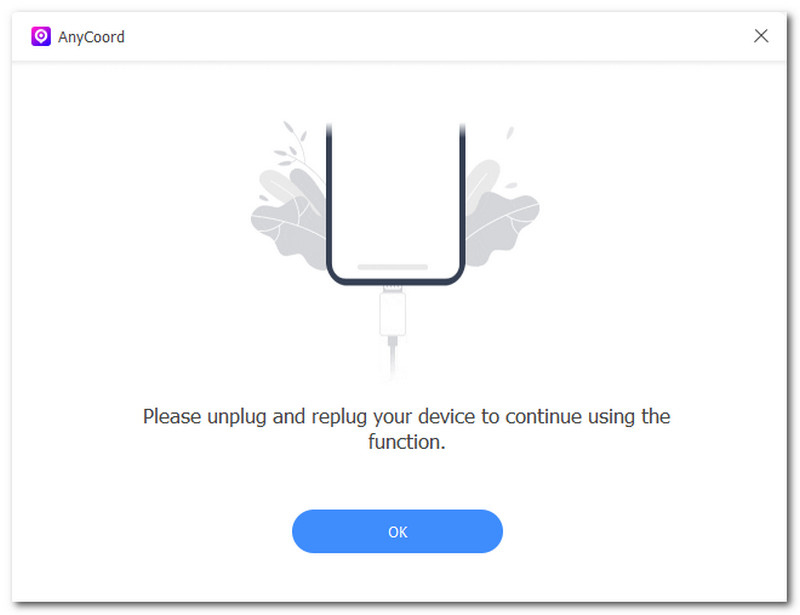
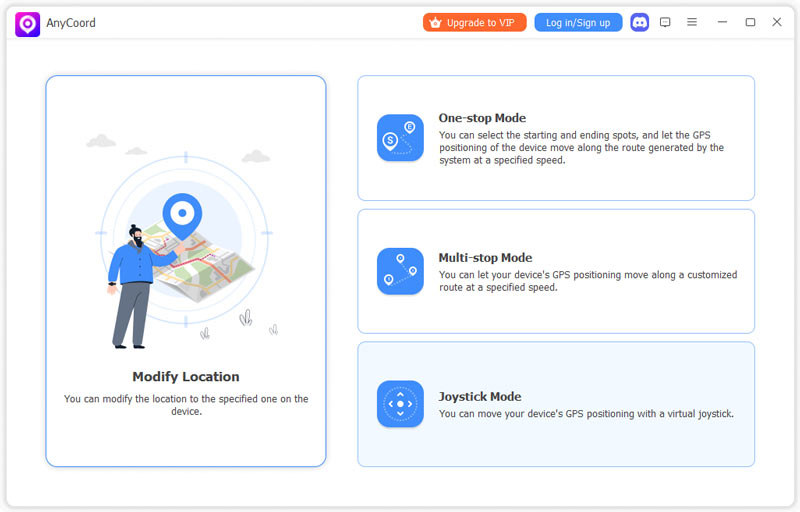
Step 2. Once you have managed to connect your mobile device and desktop device together, in the software tool's main interface, click the Modify Location function to access its location-changing features.
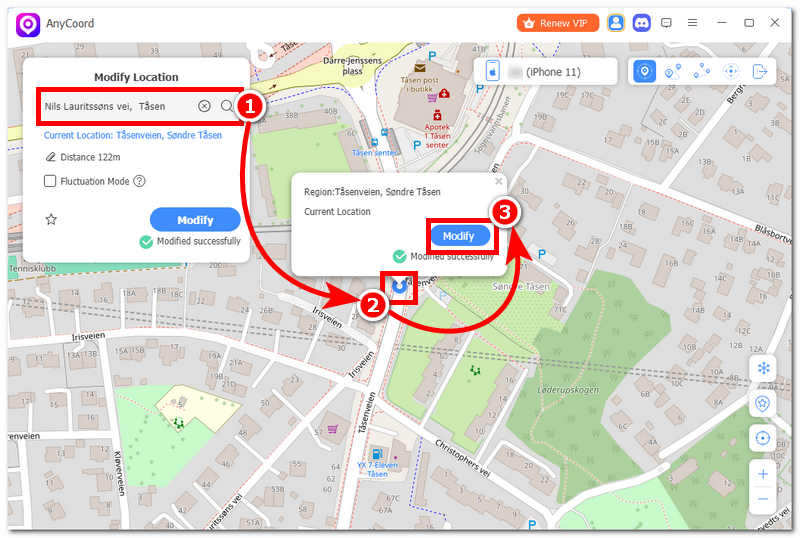
Step 3. After clicking Modify Location, the software will redirect you to a new window with a virtual map. From there, simply use the search bar function to search for the location you wish to use in your Instagram location.
Step 4. Once you have your location set up, click the Modify button, and the tool will change your device location to the one you just entered.
Part 3. FAQs about Share Live Location on Instagram
-
1Can I stop sharing my location before the hour ends?
Yes, the user can stop sharing their location before the 1-hour duration ends. It follows the same steps for sharing, so it is easy to navigate and use.
-
2Who can see my live location?
The people or users who may be able to see your location are the ones you have sent your live location to. Through personal chats or GCs, this ensures they can only see your live location for about an hour, or until you stop sharing it.
-
3Can I share my live location on Instagram privately?
Yes. Your live location is only visible to the people you choose to share it with through Instagram DMs.
-
4Does Instagram show my live location to followers?
No. Instagram does not automatically share your real-time location with followers. They can only see locations you share, such as a Story Location Sticker.
Conclusion
Instagram location sharing is a useful feature that lets users share their current location with others. Thus, it is also important to know who you want to share your location with for your safety. This article lists 3 methods for sharing or showing your location on Instagram. If you still want to use Instagram without sharing your real location, you can spoof your location with a third-party tool like the reliable AnyCoord.
AnyCoord is the best tool to change, hide, or spoof your location in games, social media apps, and other apps on iPhone or Android devices.
100% Secure & Clean
100% Secure & Clean