



AnyCoord Location Changer
iOS 27 & Android 17 Supported
- No jailbreak to set a virtual GPS location/routes.
- Smooth control with 360° joystick or keyboards.
- Pro Game Mode supporting Bluetooth connectivity.
- Apply for AR games/social media/dating/map apps.
100% Secure & Clean
100% Secure & Clean

30M+Global Users
120+Countries served
100%Clean & Safe

 4.8
4.8 iMyFone AnyTo Location Changer Tool: An In-Depth Look

Edited by Caroline Ryan | Sep 15, 2026 | Virtual Location
Suppose you want to fake your location for personal or security concerns and don’t know what to do. To help you get started, you must use a third-party tool that acts as a location changer while securely doing it. Why go to a place physically when you can spoof your location in seconds? Introducing iMyFone AnyTo location changer tool for you to get your hands on. Transforming your physically demanding game experience with a seamless and laidback one, enjoy streaming content from different countries, expand your social circle, and explore a world of entertainment, all from the convenience of your own surroundings. Please continue reading to examine the iMyFone AnyTo location changer for iOS and Android tools based on its key features, functions, availability, and the perfect alternative to such a powerful tool.
Contents:
Part 1. iMyFone AnyTo Review
iMyFone AnyTo location changer is a software tool that can temporarily alter a mobile or desktop device's location and use another. Moreover, its function is not limited to gaming, content viewing, and dating. It also helps users fake their location when they feel like their security and location are at risk, preventing other suspicious applications and programs from tracking the users. Besides being beneficial to users, iMyFone anyTo has some exciting, vital features.
The software boasts a 1-click GPS location change feature by compiling a set of modes that address different uses in location switching. Thus, the modes are Two-spot, Multi-spot, Jump Teleport, and Joystick Mode, which are accompanied by customization of movement speed to mimic actual movement. By the way, iMyFone AnyTo supports iOS 27 Beta and Android 17.
• Batch location changer multiple devices at once in SVIP.
• It can simulate route movement.
• Customization of route movement speed.
• Four modes of location-changing features.
• Search bar location input functionality.
• Access and keep a record of history for easy revisit.
Is iMyFone AnyTo Free?
iMyFone AnyTo is a subscription-based location switcher tool. It offers potential users a free version to test its capabilities before purchasing. But the free trial has many limitations, especially on the iOS version. You’d better try the basic features on the Android or PC versions.
In terms of subscriptions, there are VIP, SVIP, and Business versions. VIP can meet basic location-change needs, and SVIP is convenient for AR game players with more flexible settings, like joystick, PoGo Atlas/Search, etc. Business version is best for multi-device usage.
Here are the comprehensive iMyFone AnyTo pricing plans.
| 1‑Month Plan | 1‑Quarter Plan | 1‑Year Plan | Lifetime Plan | |
| VIP | $14.99 | $29.99 | $59.99 | $89.99 |
| SVIP | $19.99 | $39.99 | $79.99 | $149.99 |
In addition, iMyFone AnyTo also offers a business plan, which has the same features as SVIP. It provides two options for monthly and lifetime subscriptions with different numbers of devices.
Is iMyFone AnyTo Safe?
While the software is a well-crafted tool, it poses a concern about its security and safety. To answer that concern, iMyFone AnyTo proves its worth by being one of the safest software tools. It avoids the risk of leaking a user's information and being used against them. The living proof is the number of satisfied customers, with over 85 million users and cases used.
| Pros | Cons |
• Fast and no delay location switching process. • Easy to navigate user interface. • Desktop and mobile application availability. | • iOS mobile app can only be installed through their desktop software. • Limited free version feature use. |
Part 2. How to Use iMyFone AnyTo
Two-Spot Mode
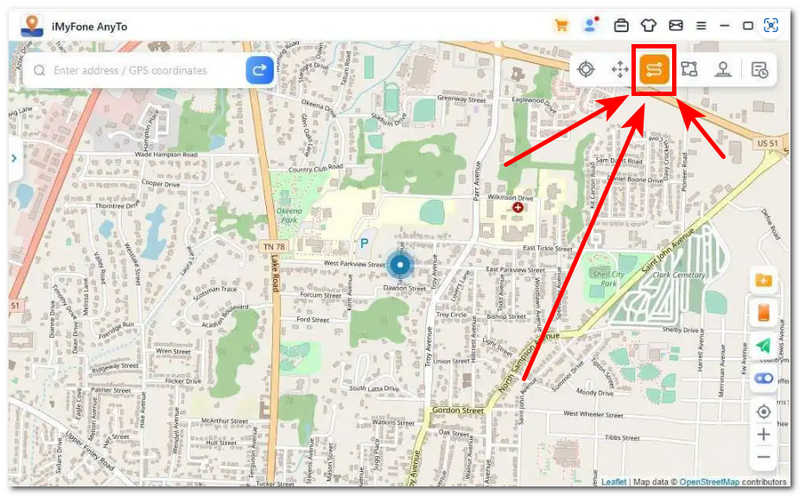
Step 1. From the interface, kindly select the Two-Spot mode on the software interface.
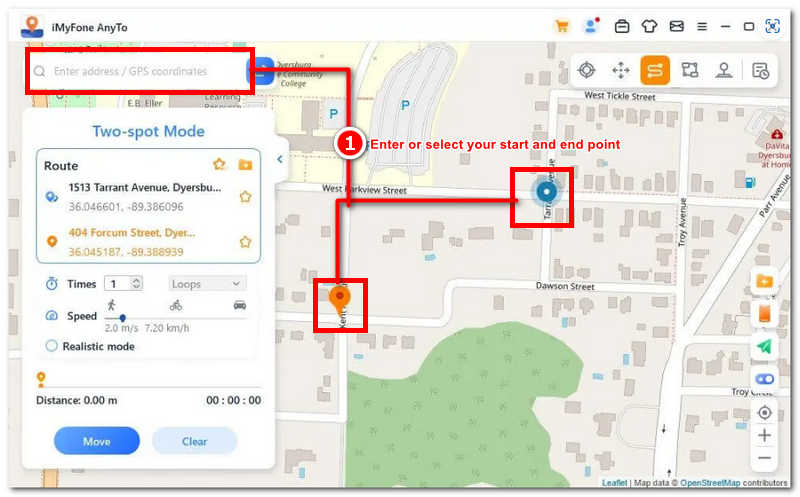
Step 2. Start pinpointing your start and end point, or enter the address or coordinate in the search bar.
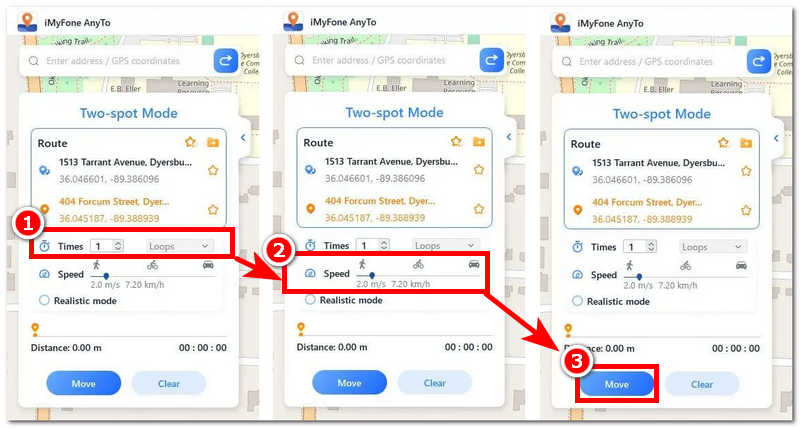
Step 3. Next, select the number of times you want to move back and forth between the two places you just entered, then drag the speed bar underneath it to customize the route movement speed.
Step 4. Finally, click on the Move button to start the process.
Multi-Spot Mode
Step 1. Click on the Multi-Spot Mode located in the upper-right corner of the software.
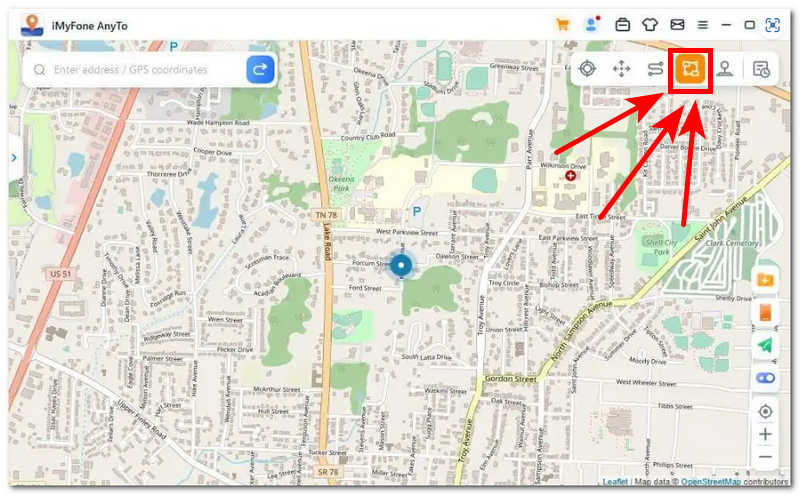
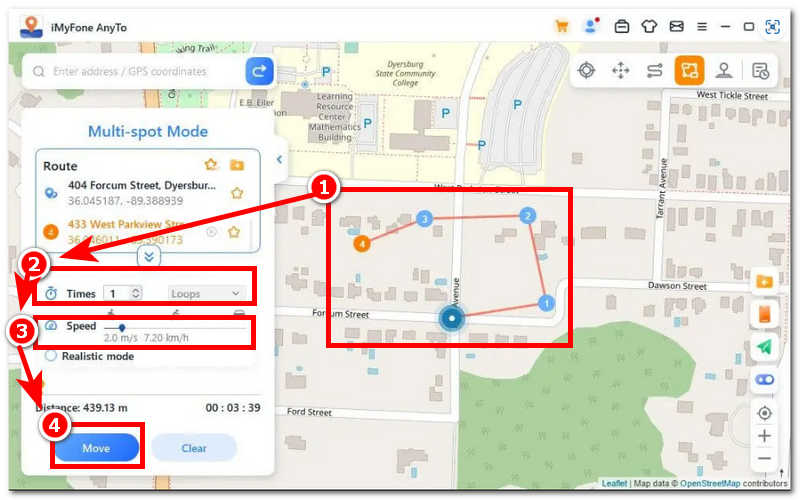
Step 2. Select a multiple spot on your map that you want to pass.
Step 3. Adjust the number of times you want to go back and forth and the route movement speed, and once you are satisfied, click the Move button to start the movement.
Jump Teleport Mode
Step 1. To navigate a Jump Teleport Mode, select it through the upper-right corner of the software interface.
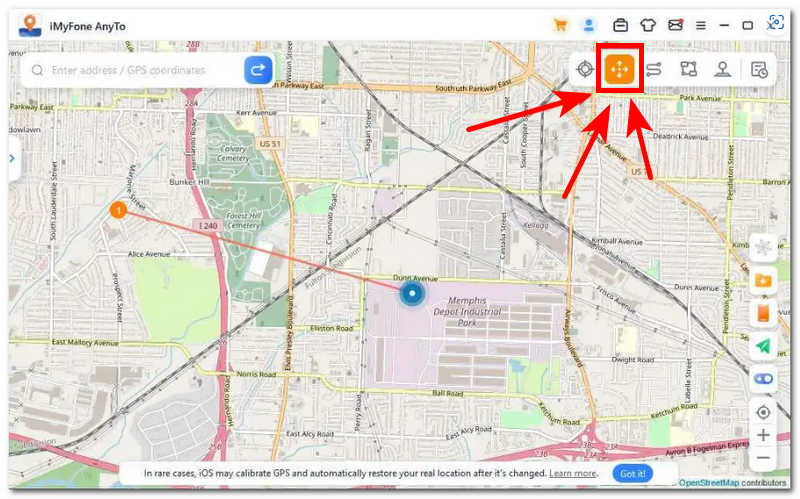
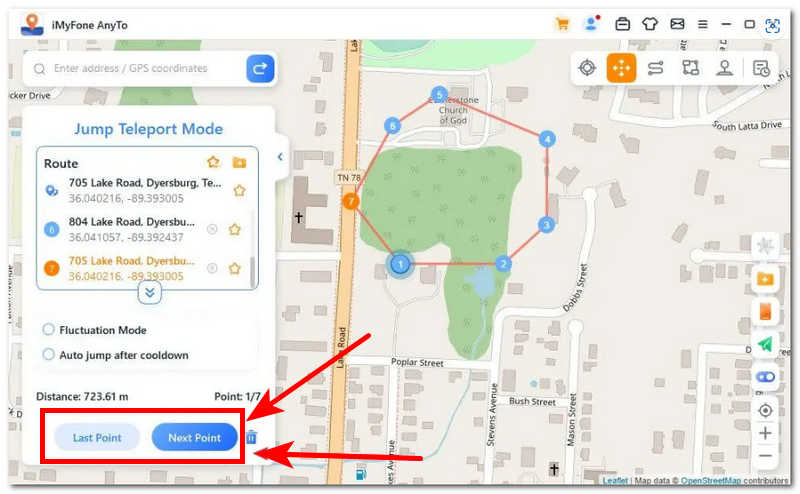
Step 2. Select multiple jumping spots on your map, then click the Move button to proceed to the next point.
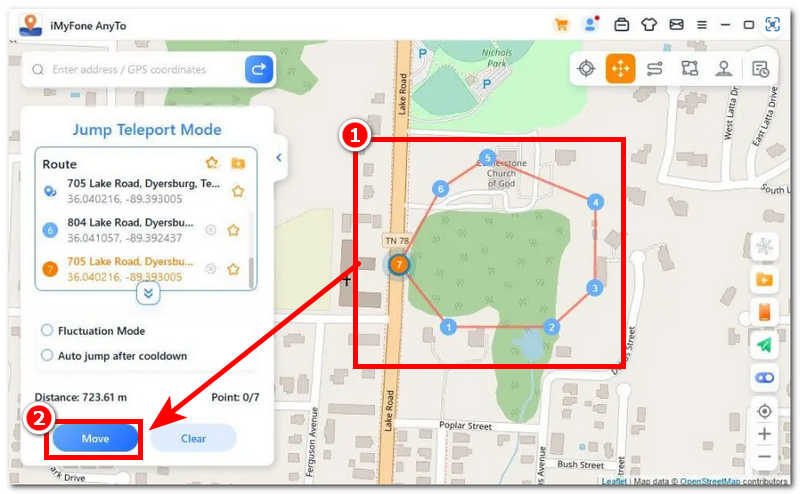
Step 3. Then click the Next Point to proceed to the next, and repeat until you reach the last point.
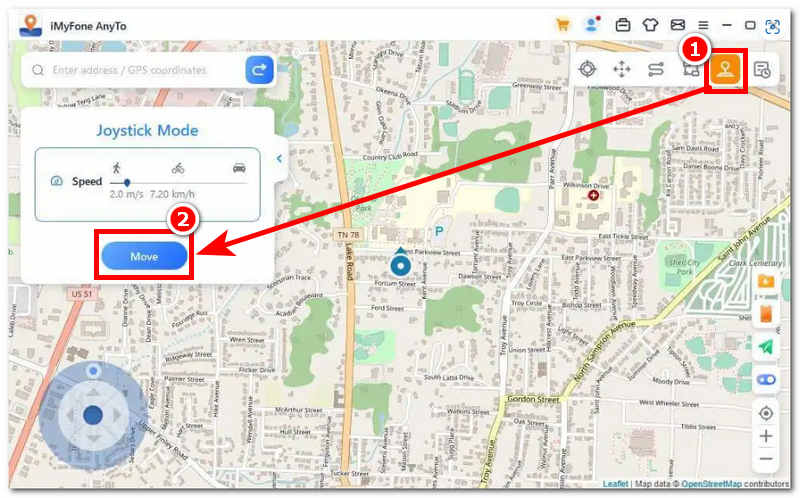
Joystick Mode
Step 1. Select Joystick Mode at the upper part corner of the software and click the Move button to proceed.
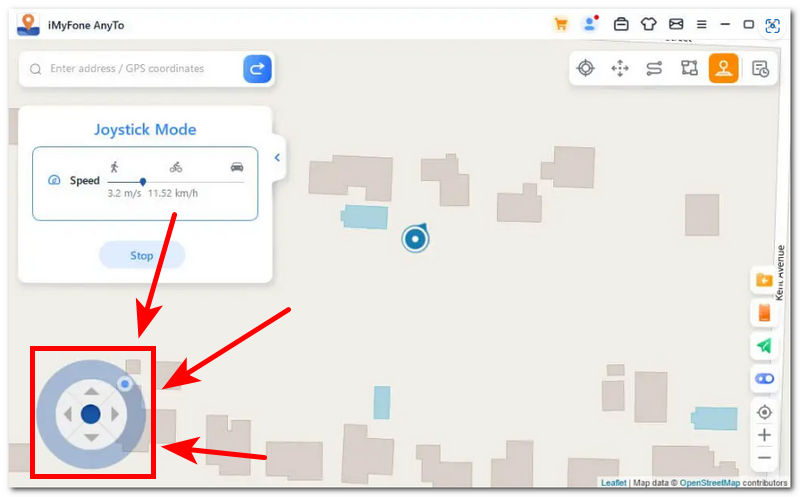
Step 2. Start moving by clicking on the W, A, S, D, or arrow keys Up, Down, Left, and Right to control your movement in the map.
Part 3. A Great AnyTo Alternative – AnyCoord
Even though iMyFone AnyTo comes with many useful location-spoofer functions, its somewhat high price might not suit users requiring frequent location changes. Moreover, there might be some location issues or connectivity problems with the software. However, for a cheaper and easier-to-use alternative, users can consider using AnyCoord. It has all the basic functions of location change while being less expensive than iMyFone AnyTo.
AnyCoord also has Jump Teleport/Two-Spot/Multi-Spot/Joystick Modes. With just three steps, you can spoof your real location or set a virtual route. There is also a Pro Game mode designed for AR game players, which supports Bluetooth connection to make playing smoother. You don't have to go out in reality to play games.
100% Secure & Clean
100% Secure & Clean
How to use AnyCoord to change location?
Step 1. First, connect your mobile device to the location changer. Then, select the Mode you need from the main interface. Take Modify Location as an example.
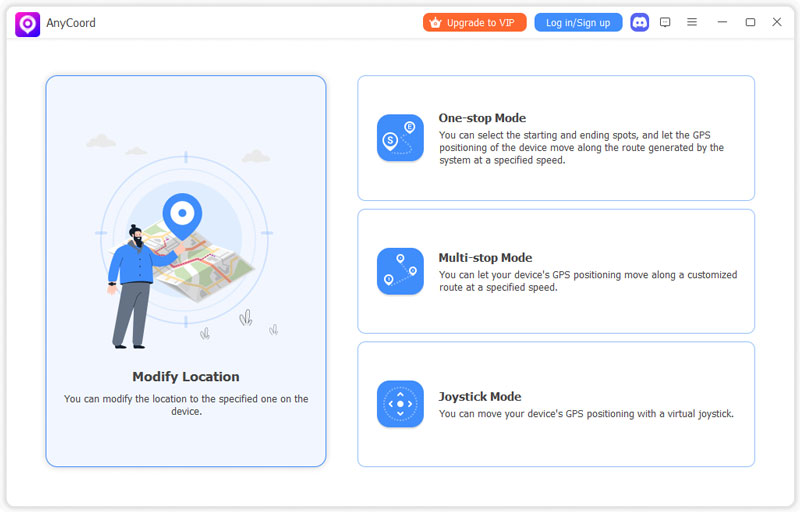
Step 2. Then, a map window will pop up and show your current location.
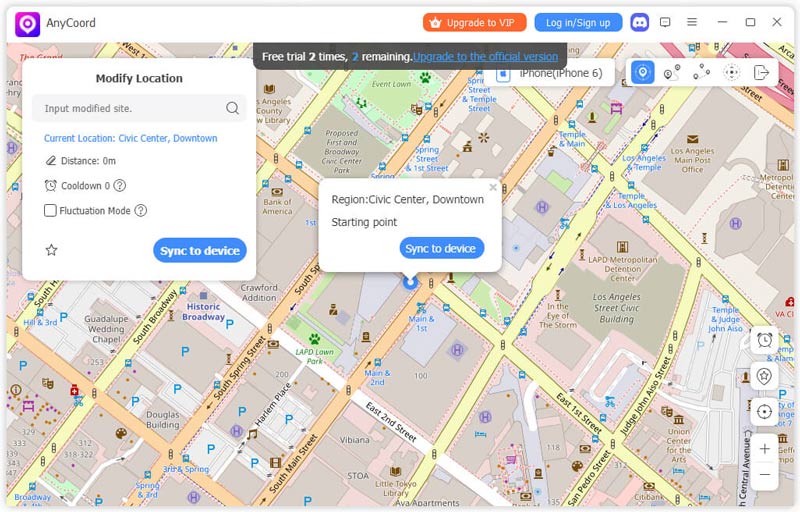
Step 3. Next, input the desired location into the Modify Location box in the upper-left corner of the interface. Click the Modify button to change your mobile device's location.
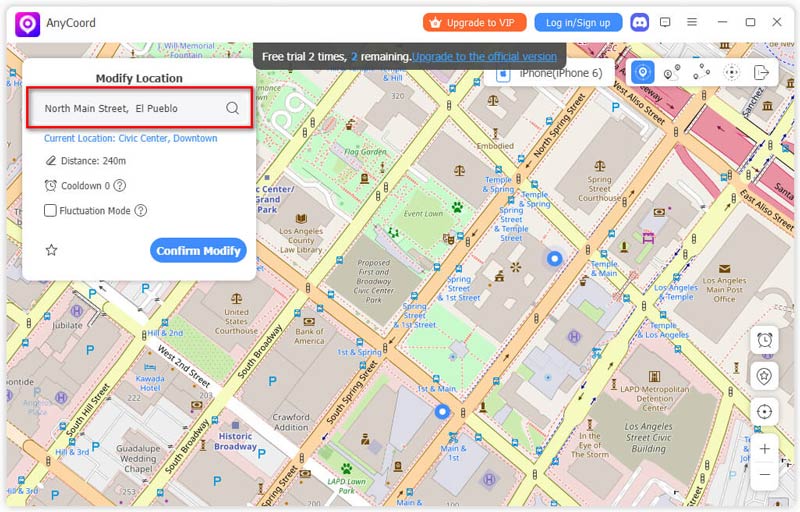
Before changing your device’s location, you can check the box for Fluctuation Mode to let the virtual location be a few meters away from the selected location.
| iMyFone AnyTo | AnyCoord | |
| Price | Start at $14.99 | Start at $9.95 |
| Supported devices | 5 | 6 |
| Features | Jump Teleport/Two-Spot/Multi-Spot/Joystick | Jump Teleport/Two-Spot/Multi-Spot/Joystick |
| Jailbreak | No | No |
| Connectivity | USB/Bluetooth | USB/Bluetooth |
Part 4. FAQs about iMyFone AnyTo
-
1What limitations does iMyFone AnyTo’s free version have?
iMyFone AnyTo has many limitations. First, users cannot freely try its iOS version. Second, the Android version doesn’t allow users to use Game Mode, Teleport, Two-Spot Navigation, Joystick, Multi-Spot route, or Jump Teleport route. Users can only use Live Altas/Cooldown Timer/Import and Export Route/Favorites and History/Round Trip/Fluctuation Mode/Realistic Mode/Reset Location. Third, in the PC version, although you can try Teleport, Jump Teleport route, Two-Spot Mode, and Multi-Spot route, they can also be used once. The joystick can be used for 15 minutes.
-
2Can AnyTo support the latest iOS and Android?
Yes, as we mentioned above. iMyFone AnyTo supports the latest iOS 17 Beta and Android 17. Users can use their devices without hassle.
-
3Will iMyFone AnyTo be detected by Pokémon GO?
No. iMyFone AnyTo uses a stable and system-level location change method that makes your virtual location appear natural to apps and games. There is no abnormal GPS signals and no awkward movement.
Conclusion
As excellent of a tool as it seems, reviewing iMyFone AnyTo has shown that the software tool has a knack for effectively changing locations; with this, it resulted in being received by many users. Through this well-curated review of the software, we ensure that you are guided and on the right path in preparing to navigate it while also giving you information on what to expect from its key features. If iMyFone does not work when you try using it for any reason, we have also included an alternative software called AnyCoord. This alternative software-based tool offers a similar process to iMyFone, providing a fast-performing, highly secure, and easy-to-navigate tool for switching locations. It is comparable to iMyFone in terms of functionality and is a reliable alternative if iMyFone doesn't meet your needs.



AnyCoord is the best tool to change, hide, or spoof your location in games, social media apps, and other apps on iPhone or Android devices.
100% Secure & Clean
100% Secure & Clean