



Find My Friends Not Updating Location: Here’s How to Fix

Edited by Caroline Ryan | Jul 15, 2026 | Virtual Location
It is very convenient to share one's location with trusted individuals using Find My Friends. Nonetheless, there will always be some users who have to deal with issues such as Find My Friends not updating their location, displaying incorrect location data, or ceasing location sharing for some reason. Such an experience is often quite annoying as you need the app to function properly for various reasons.
Well, it is nice to know that such problems can easily be fixed. In this article, we will look into the most common causes of Find My Friends not updating location and the ways to fix it.
Contents:
Part 1. Why is FMF not refreshing?
If you see Find My Friends stuck in one location, it indicates that something is going wrong, causing this error. This could be due to:
• If the GPS on your phone is turned off, Find My Friends will not be able to obtain your exact location. Besides, a weak network connection can also cause Find My Friends to not update your location.
• Your friend's iPhone has Location Services disabled, or the Hide My Location feature on their iPhone is active.
• Background app refresh is disabled. It is a setting that allows apps to update while they are in the background. Or the phone automatically opens the battery saving mode to save the battery.
The reasons above all have the possibility of causing the Find My Friends location not to update. You can use the above reasons to self-check if these are the causes of the Find My Friends not updating location.
Part 2. How to Fix Find My Friends Not Updating Location
After we discussed the reasons that may cause these issues, we provide you with three methods to help you fix this problem.
Quickly check 3 solutions:
| Situations | Solutions |
| Internet is unstable or closed | Check and Switch to Available Internet Connection |
| GPS is off | Enable GPS Services and Location Sharing |
| The background software is not running | Enable Background App Refresh on iPhone |
| iOS is in the lower version | Use the Improved Find My Location Refresh Mechanism in iOS |
Fix 1. Check and Switch to Available Internet Connection
To use the Find My Friends feature need an internet connection to work. So, when you want to use this function, ensure that both your device and your friend's device have an active internet connection.
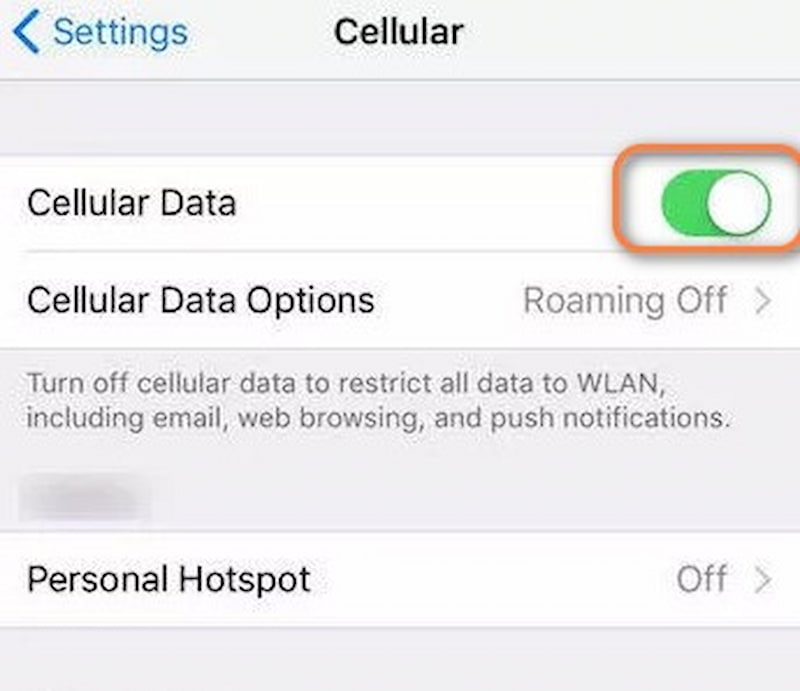
Step 1. Find your iPhone’s Settings option.
Step 2. Select Cellular and then switch Cellular Data a couple of times to reset and connect to the network. Keep the network working.
Fix 2. Enable GPS Services and Location Sharing
To solve Find My Friends not updating location, you need to make sure you enable GPS services and let your location be shared with other people.
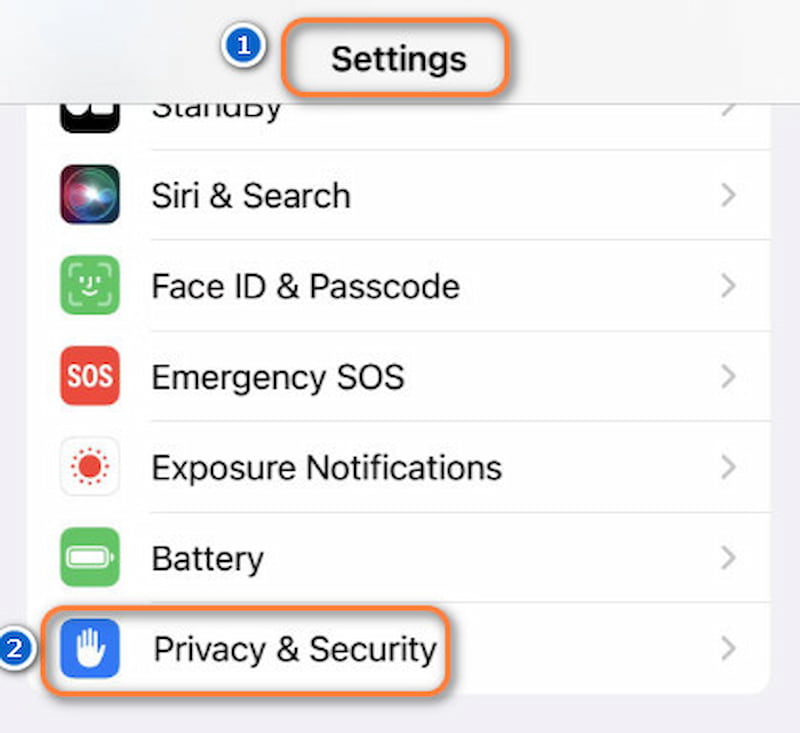
Step 1. Open Settings and find the Privacy & Security.
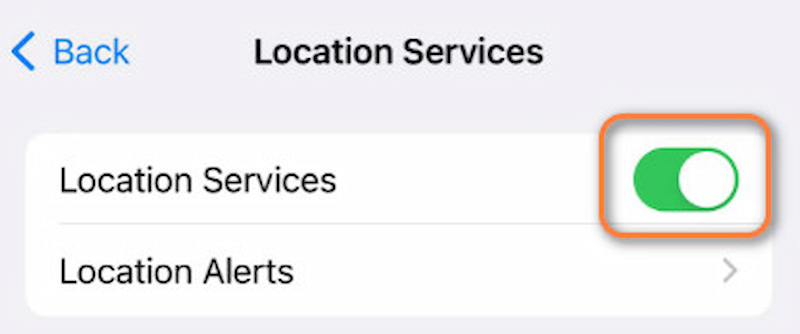
Step 2. Turn on Location Services. All the apps will be listed.
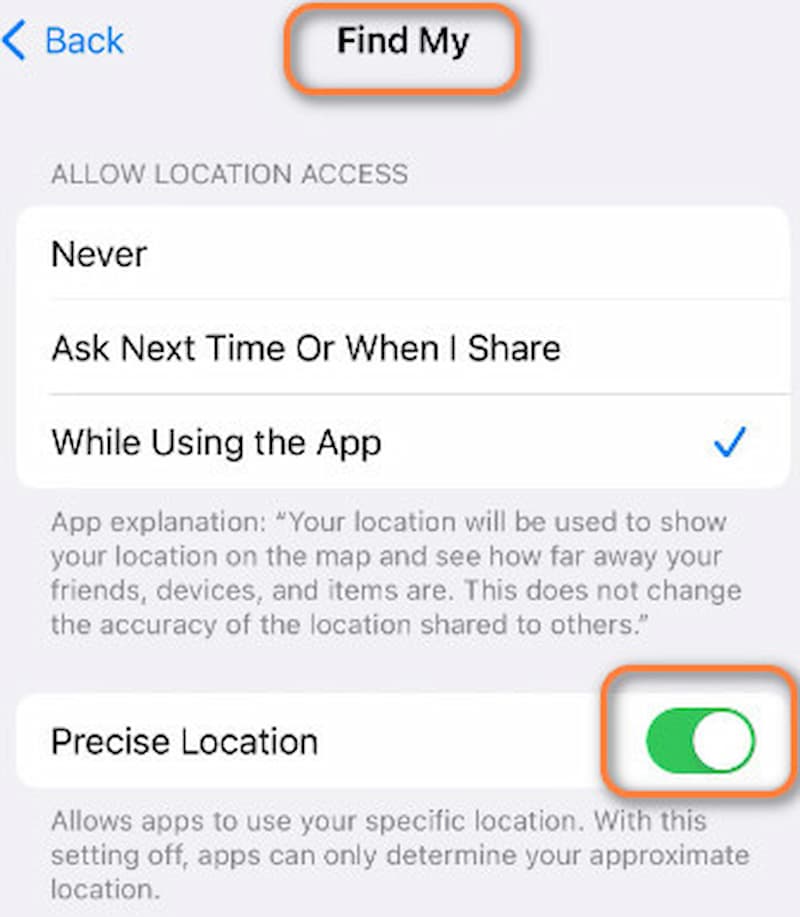
Step 3. Then tap Find My and open the Precise Location to give this app the right to obtain your location.
Fix 3. Enable Background App Refresh on iPhone
Enabling background app refresh is essential. Because it allows apps to function even when they are not actively in use, without it, your location will not be updated until you reopen the app. That might be an important reason for your Find My Friends location not updating. Below are some instructions to activate this feature.
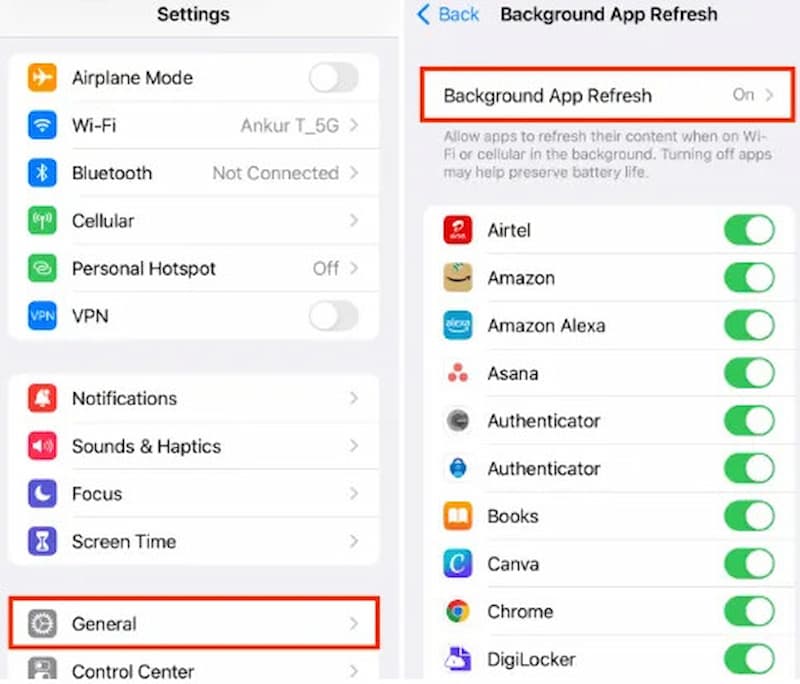
Step 1. Go to Settings and tap General.
Step 2. Next, navigate to Background App Refresh and tap it.
Step 3. A list of apps will now be displayed. Please make sure to enable Background App Refresh for Find My.
Fix 4. Use the Improved Find My Location Refresh Mechanism in iOS
With recent iOS updates, the Find My location-sharing service has improved the efficiency of location updates between devices. If you do not receive any location updates in Find My Friends, it is recommended that you upgrade your iPhone to the latest iOS version.
Steps to improve Find My Location updates:
Step 1. Open Settings on your iPhone.
Step 2. Go to General > Software Update.
Step 3. Install the latest available iOS update.
Step 4. Make sure Bluetooth, Wi-Fi, and Location Services are enabled.
Step 5. Open the Find My app and refresh the location information.
With the four methods above, you can follow and try to enable your Find My Friends location services to work again. Simple and easy to follow, if you have something wrong with your settings, then it can help you fix these issues very well.
Part 3. Update Find My Location as Needed by Pro Location Changer
By doing the above, you can update your real location and make it easier for your family and friends to find you. But sometimes, don't you want to tease your friends when you are playing games together in the morning, only for them to find out in the afternoon that you're in France from the Finding My Friends location? This sounds very interesting! We recommend you try AnyCoord. It can help you change your location with one click, whether you want to joke with your friends or plan to play a location-based game.
Main Features:
- • Change GPS location to anywhere without jailbreak.
- • Set fake moving paths with adjustable, natural speeds.
- • 360° Joystick for real-time and free location control.
- • Spoof location on AR games/social media/dating/positioning apps.
100% Secure & Clean
100% Secure & Clean
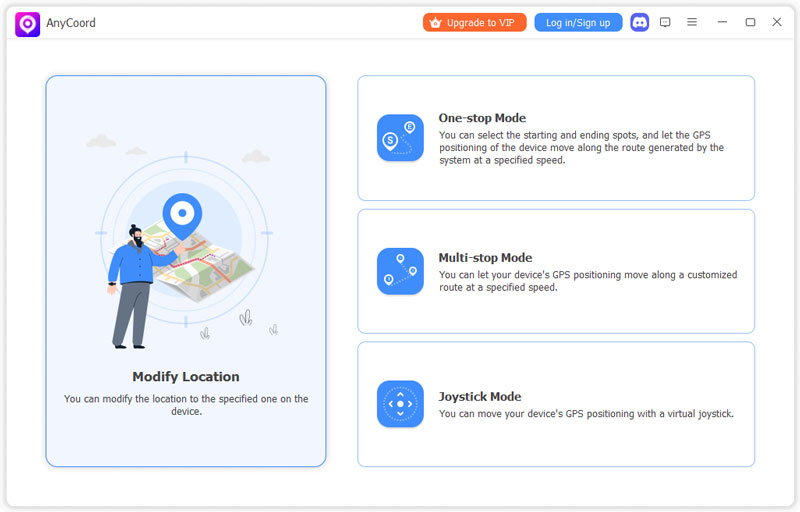
Step 1. Connect your iPhone to the computer using the USB cord. When you launch the program, you can see an elegant interface. Choose the mode that you require.
Step 2. At this point, AnyCoord will display a map with your current location on it.
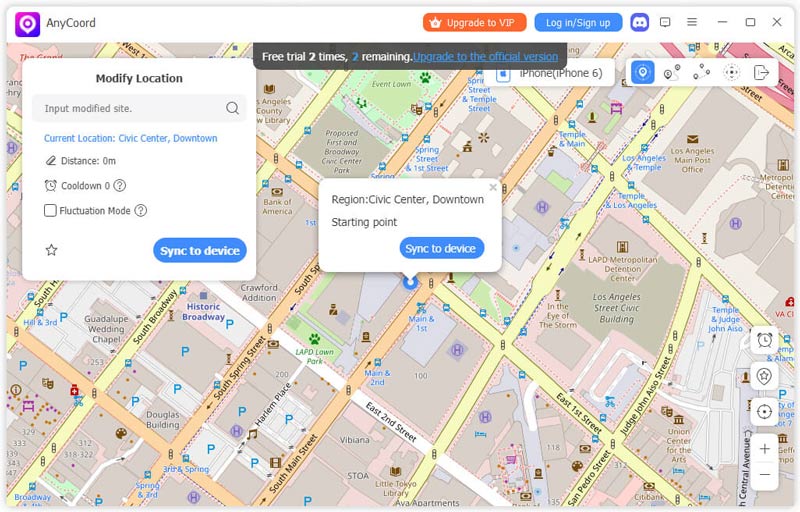
Step 3. Enter the destination you wish to use as your iPhone's GPS location by typing it into the Modify Location box, which is situated in the upper left corner of the screen.
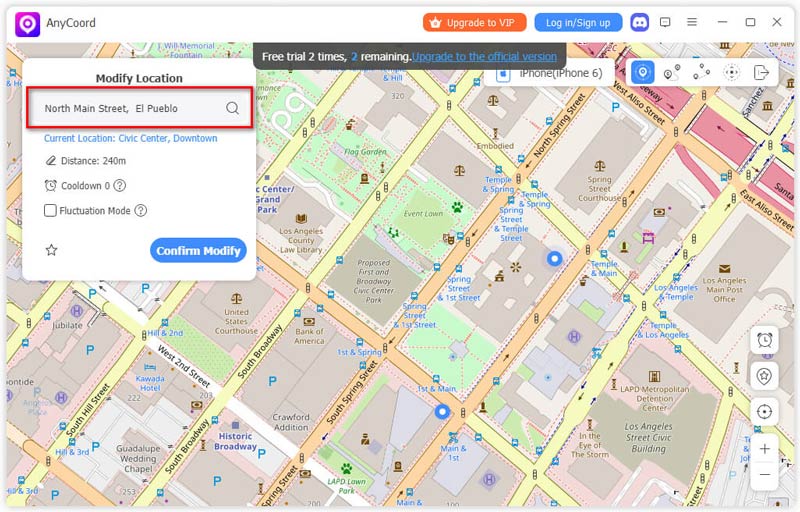
To change the location of your iPhone, please make sure the place name you input is correct and then click the Confirm Modify button.
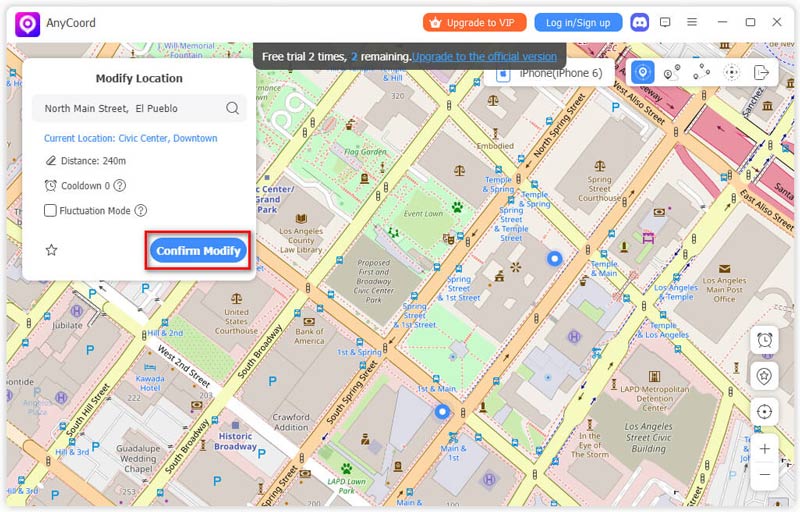
The location of your iPhone will be correctly modified.
AnyCoord is an incredibly strong and practical tool that you can use to spoof locations on social media or Find My Friends functions. You don't have to worry about location issues anymore by using AnyCoord.
Part 4. FAQs about Find My Friends Stuck
-
1How to tell if someone paused their location?
Open the Find My app and view their location status. If their location is not updating, shows an old location, or displays messages like Location Not Available or No Location Found, they may have stopped sharing their location, disabled Location Services, lost internet connection, or turned off their device. You can also check the conversation in Messages to see if location sharing has been stopped.
-
2Why does Find My Friends say no location found?
The friend’s iPhone you want to locate may be out of battery or in weak internet. Otherwise, they have disabled their location services to prevent locating by people.
-
3How to pause location on Find My Friends?
First, open the Settings on your iPhone and tap on your Apple ID. Then, select Find My. Finally, simply turn off the toggle next to Share My Location to disable the function.
Conclusion
When we want to use Find My Friends but it is not working, it is very upsetting; this article explains why Find My Friends is not updating location and offers four methods to help you solve the problem. As a bonus, we recommend a very useful and interesting tool called AnyCoord, which can help you change your GPS location very easily. I hope you find this article can solve your problems effectively.


AnyCoord is the best tool to change, hide, or spoof your location in games, social media apps, and other apps on iPhone or Android devices.
100% Secure & Clean
100% Secure & Clean